GUI customization
Every player-accessible1 GUI is editable by two means
In-game editing
The in-game editor can be accessed either through /ah admin or /ah edit command (see Commands & permissions). You can pick any GUI you want to customize. Let's use the main GUI as an example.

Normal and display items
Every #normal-items and #display-items are displayed normally. You can:
- Click them to edit them
- Right-click them to move them to a new slot
- Shift-click them to disable them
Placeholder items
Every placeholder item is displayed as a glass block. Their name is the same as in the file (#file-editing). You can right-click a glass block to remove it from the slots list.
Filler items
Every empty slot is displayed as a plus sign. It can be clicked to add a disabled item in this slot, or a placeholder item. It can also be right-clicked to edit the #filler type.
File editing
In /plugins/NexusAuctionHousePlus/guis, you'll find a file for each customizable GUI.
Let's use the main GUI as an example.
#Model = Custom Model Data
title: "Auction House"
rows: 6
filler:
  type: "GRAY_STAINED_GLASS_PANE"
items:
  sortslot: #if no sorts exist, will be replaced by items
    enabled: true
    replace-with-filler: true #If no item is displayed in one of these slots, wether or not to replace it with the filler
    slots: [0, 9, 18, 27, 36] #Scroll arrows shall be placed in these slots if there are too many sorts to display
  itemslot:
    enabled: true
    replace-with-filler: false #If no item is displayed in one of these slots, wether or not to replace it with the filler
    slots: [1, 2, 3, 4, 5, 6, 7, 8,
            10, 11, 12, 13, 14, 15, 16, 17,
             19, 20, 21, 22, 23, 24, 25, 26,
             28, 29, 30, 31, 32, 33, 34, 35,
             37, 38, 39, 40, 41, 42, 43, 44]
  search:
    enabled: true
    row: 6
    column: 2
    type: "OAK_SIGN"
    name: "&r&e&lSearch"
    model: 0
    amount: 1
  sorter:
    enabled: true
    row: 6
    column: 8
    type: "HOPPER"
    name: "&r&e&lSort"
    model: 0
    amount: 1
  stash:
    enabled: true
    row: 6
    column: 9
    type: "CHEST"
    name: "&r&c&lRetrieve auction items"
    model: 0
    amount: 1
  profile:
    enabled: true
    row: 6
    column: 5
    type: "PLAYER_HEAD" #Uses the player's head
    name: "&r&e&lView your own profile"
    model: 0
    amount: 1
  transactions:
    enabled: true
    row: 6
    column: 3
    type: "CLOCK"
    name: "&r&e&lView your transaction history"
    model: 0
    amount: 1
  prevpage: #items below this: only enabled when needed
    enabled: true
    row: 6
    column: 4
    type: "ARROW"
    name: "&r&e&lPrevious page"
    model: 0
    amount: 1
  nextpage:
    enabled: true
    row: 6
    column: 6
    type: "ARROW"
    name: "&r&e&lNext page"
    model: 0
    amount: 1
GUI translation
As explained in Configuration, default translations will be used instead of the names set in this file if you set translate-guis to true.
Item types
There are four types of items in GUIs
Normal items
nextpage:
    enabled: true
    row: 6
    column: 6
    type: "ARROW"
    name: "&r&e&lNext page"
    model: 0
    amount: 1
Example item
In the example above, you can see that this item can be disabled, and its name can be customized if you set translate-guis to false, as explained above. You can pick its row and column, custom model data (if you use a custom resource pack), and the item amount and type (full list at https://hub.spigotmc.org/javadocs/bukkit/org/bukkit/Material.html#enum-constant-summary).
Display items
  display: #Display of the item
    enabled: true
    row: 2
    column: 5
from confirm-sell.yml
This item can only be disabled, and its row and column can also be edited. It is used to display an item, in this case, the item the player is trying to sell.
Placeholder items
  itemslot:
    enabled: true
    replace-with-filler: false #If no item is displayed in one of these slots, wether or not to replace it with the filler
    slots: [1, 2, 3, 4, 5, 6, 7, 8,
            10, 11, 12, 13, 14, 15, 16, 17,
             19, 20, 21, 22, 23, 24, 25, 26,
             28, 29, 30, 31, 32, 33, 34, 35,
             37, 38, 39, 40, 41, 42, 43, 44]
from ah.yml
This item type can be disabled, and you can choose to replace it with the filler (#filler) if the slot is empty. You need to specify an array of slots where the items will be placed. This is used for items that need to be displayed in large amounts, such as the items for sale on the auction house.
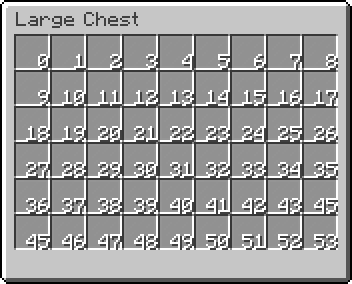 Slot IDs that are used in the configuration of the item
Filler
Fills empty slots of the GUI. Only its type can be edited.